Our network map learns Wi-Fi and Zigbee, and notices moved cables
Short version: our small inventory tool now draws Wi-Fi and Zigbee on the same map as the cables. It also notices when a machine has been replugged on another switch port, and offers to fix the record in one click. The Zigbee view found a device that had been offline for two weeks: the plug of the convector that turned out to be broken in the heating post.
The tool
It is an in-house inventory: where the copies and backups of each dataset live, what hardware each machine has, and how everything is connected. Plain PHP and PostgreSQL, no framework, no authentication (it only lives on a trusted LAN). Collectors run from cron every 15 minutes. They log in to the switches’ web interfaces and read port states, VLANs and MAC tables.
One rule matters for everything below: a link is a physical cable, never a logical connection. An unknown port is stored as unknown and shown as “?”, never guessed.
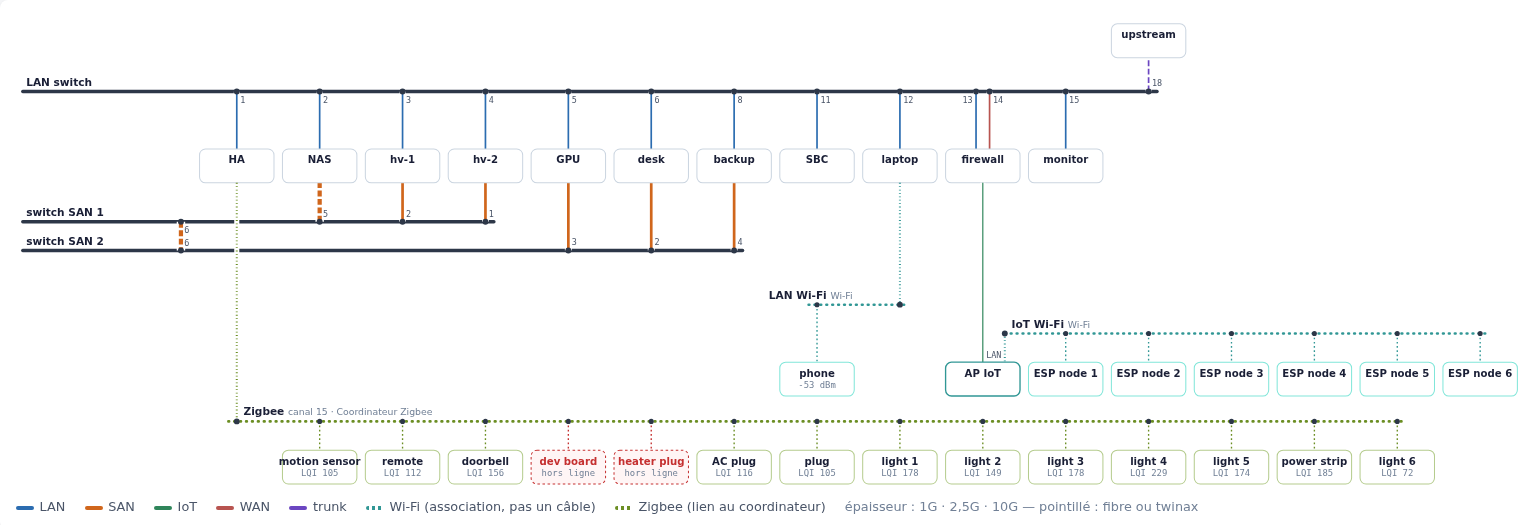
The network map (the UI is in French; click for full size). For this post, machines and devices are renamed after their role (hv-1 and hv-2 are the hypervisors, “desk” is the workstation) and addresses are removed. Solid lines are cables, coloured by network as in the legend at the bottom; dotted teal lines are Wi-Fi associations (“association, pas un câble”: association, not a cable); dotted green lines join Zigbee devices to the coordinator. Line thickness is the link speed, and dotted cables are fibre or twinax.
Moved cables
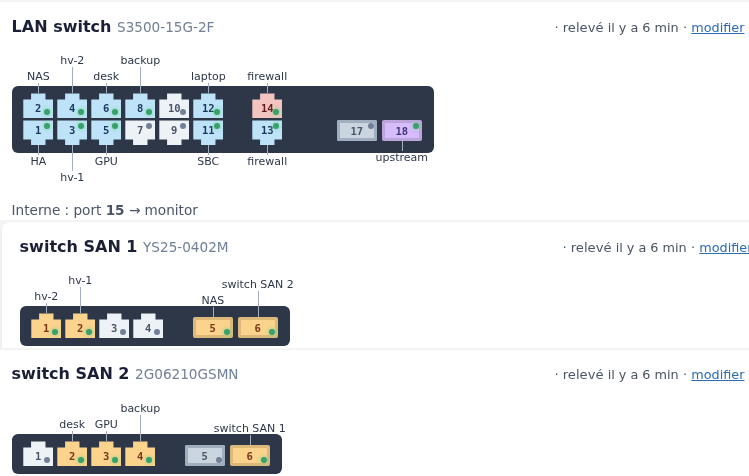
Switch front panels, drawn from a small text template per model (port order, SFP cages, gaps). Each port shows its link state (green dot) and its network colour, and the machine at the other end of the cable is written next to it. “Interne : port 15” (“internal”): this switch is an appliance that combines a switch (14 RJ45 ports, 2 SFP cages and one internal port) and an Atom single-board computer in one box, wired together on the internal port 15. The SBC was recycled as the monitoring machine (Nagios, Cacti), and the switch is the LAN core. “relevé il y a 6 min” means “collected 6 minutes ago”.
Before, a machine replugged on another port of the same switch produced three alerts: “declared here but seen there”, “link down”, and “port with no cable”. Now the network page recognises the pattern and shows one alert, “X changed port: declared on 5, seen on 7”, with a button to correct the cable (and one to correct all moves at once).
A move is only proposed when all of these hold:
- the switch was actually collected;
- the machine’s MACs are seen on exactly one port of that switch;
- that port is not already one of the machine’s declared ports;
- the destination port does not keep a cable that is staying in place. If another cable on it is moving too, that is fine: two machines swapping ports are two moves.
The fix is recomputed when the button is pressed, not taken from the page, and the cable’s notes get a line like “port 5 → 7 on 2026-10-12”.
Wi-Fi
Two kinds of access point so far:
- A laptop that runs an access point: read over SSH, with a key that can
only run
iw station dump(a forced command on the laptop’s side). - An old 3Com OfficeConnect AP, through its web interface. It has
quirks worth writing down. It only speaks HTTP/1.0. It has
one admin session, bound to the client IP. A new login always
succeeds, but it ejects the current session; the ejected browser
lands on
duplicate.htm. So the collector always logs out explicitly, and the person in front of the admin page will occasionally be kicked out by it.
On the map, each Wi-Fi network is a dotted rail, joined to whatever carries the access point: the machine itself, or the cable to the machine the AP is plugged into. Wi-Fi clients seen behind a machine are listed under it, the same way virtual machines are listed under their hypervisor.
Zigbee
The Zigbee coordinator is a USB dongle on the Home Assistant box, run by
ZHA. The collector asks Home Assistant’s websocket API for
zha/devices (read only). PHP has no websocket client in its standard
library, so the collector includes a minimal one: about 70 lines for the
handshake, masked text frames out and unmasked frames in. It reuses the
same retry settings as the switch collectors. Home Assistant bans an IP
after repeated authentication failures, so the collector has its own
named token, and a refused token stops the run instead of being retried.
The Zigbee page draws a star: each spoke’s thickness is the link quality (LQI), and offline devices are red and dashed.
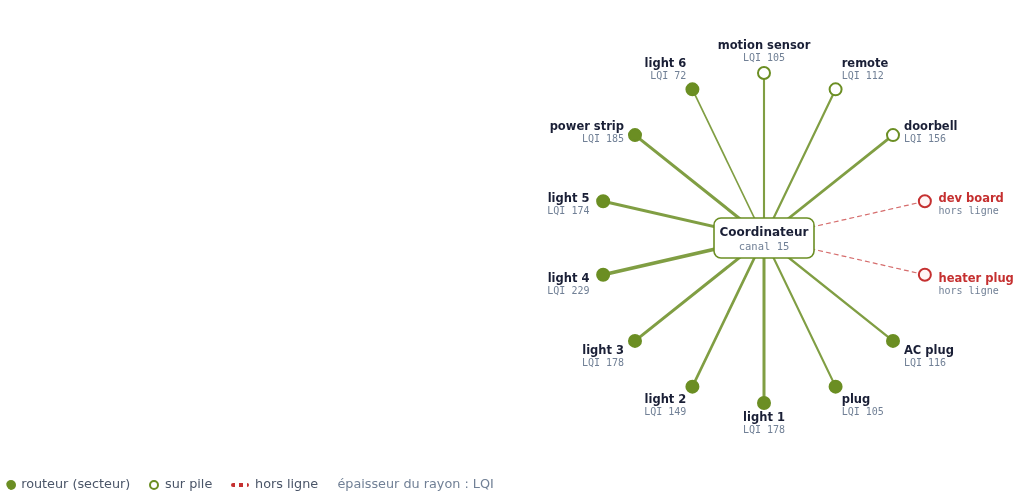
The Zigbee view, devices renamed for this post. The legend reads: mains-powered router (filled), battery device (hollow), offline (red, dashed), spoke thickness = LQI.
On the first run, two devices were offline. One was a plug named “Chauffage” (heating, “heater plug” in the picture), offline since 26 September. That is the plug of the convector whose thermal fuse blew, which the heating analysis later found again from the power meter.
Drawing radio on the map
Wi-Fi and Zigbee are “radio groups”, drawn in three passes: rails first, then the lines (on a halo where they cross a rail, so the crossing is readable), then the boxes. Each technology gets its own row, Wi-Fi then Zigbee, with its rails just above it. Each group sits under the thing it is attached to, and the columns where lines arrive are reserved so that nothing is drawn on top of them. The Zigbee coordinator is part of the Home Assistant box, so it has no box of its own: the rail starts from the box. The goal stays the same as for the cables: one big page, readable, with nothing crossing that does not have to.
There is also a dark mode now: automatic, dark or light, stored per browser.
A switch that forgot its settings
After the afternoon’s power cut, one of the 2.5 GbE switches on the storage network came back with its old IP address and default password. The settings changed ten days earlier had never been saved: on this model, a change applies immediately but is lost on reboot until you press Save under Device Management. Restoring the backup only reapplied the password while running, so we set the IP again by hand, then saved. A second, deliberate power cut confirmed it: the switch came back with the right settings. Its config export now differs from the reference by a single byte. The difference is stable and has no visible effect.
The same power cut is why the air conditioner stayed off: see the air-circulation post.