<?xml version="1.0" encoding="utf-8"?><feed xmlns="http://www.w3.org/2005/Atom" xml:lang="en"><generator uri="https://jekyllrb.com/" version="3.10.0">Jekyll</generator><link href="https://462eng.github.io/feed.xml" rel="self" type="application/atom+xml" /><link href="https://462eng.github.io/" rel="alternate" type="text/html" hreflang="en" /><updated>2026-10-19T17:23:26+00:00</updated><id>https://462eng.github.io/feed.xml</id><title type="html">462eng notes</title><subtitle>Technical notes from 462engineering: Linux, graphics, VR and the odd kernel/compositor bug we ran into while building things.</subtitle><author><name>Jonathan (462engineering)</name></author><entry><title type="html">2026-10-19</title><link href="https://462eng.github.io/2026/10/19/2026-10-19/" rel="alternate" type="text/html" title="2026-10-19" /><published>2026-10-19T13:20:00+00:00</published><updated>2026-10-19T13:20:00+00:00</updated><id>https://462eng.github.io/2026/10/19/2026-10-19</id><content type="html" xml:base="https://462eng.github.io/2026/10/19/2026-10-19/"><![CDATA[<p>This post covers work from the past week: a camera firmware written
from 14 to 16 October, and a PLC migration done on 12 October. Details
are in the linked posts.</p>

<h2 id="tuyabegone-free-firmware-for-a-cheap-lsc-camera">TuyaBeGone: free firmware for a cheap LSC camera</h2>

<p>A cloud-only indoor camera now runs a small Buildroot system. Video and
audio go through the kernel drivers only: we traced the vendor’s closed
libraries with an <code class="language-plaintext highlighter-rouge">LD_PRELOAD</code> shim and rewrote what they do. It streams
over RTSP and ONVIF, with motion events from the ISP’s own statistics.
Audio switched to AAC because UniFi Protect dropped G.711. It installs
from an SD card in two stages, keeping the factory sensor calibration,
and its first setup requires a press on the physical button.
→ <a href="/2026/10/19/tuyabegone-free-firmware-lsc-camera/">TuyaBeGone: free firmware for a cheap LSC camera</a></p>

<h2 id="a-twincat-3-machine-moves-from-windows-to-tcbsd">A TwinCAT 3 machine moves from Windows to TC/BSD</h2>

<p>A large-format 3D printer moved from the Windows TwinCAT runtime to
TwinCAT/BSD on the same industrial PC. The traps: an engineering
version that did not know the target, a corrupted drive startup
command the older version had ignored, a drive moved to the wrong sync
unit, Windows-only calls in the PLC code, and persistent positions left
behind.
→ <a href="/2026/10/19/twincat-windows-to-tcbsd/">Moving a TwinCAT 3 machine from Windows to TC/BSD</a></p>

<h2 id="how-it-connects">How it connects</h2>

<ol>
  <li>Both are about <strong>leaving a vendor’s platform</strong> (a cloud app, a
Windows runtime) while keeping the hardware.</li>
  <li>In both, the hardest part was the <strong>data that lives on the device</strong>:
the camera’s sensor calibration, the machine’s saved positions.</li>
  <li>In both, the old software <strong>quietly worked around something</strong> that
the replacement had to discover: the vendor library read audio one
period at a time (larger reads block forever), and the old TwinCAT
version skipped a corrupted startup command.</li>
</ol>

<p class="coauthors"><em>Written by Jonathan (462engineering) and Claude (Claude Opus 5.5, Anthropic) — research, debugging and drafting done together in a Claude Code session.</em></p>]]></content><author><name>Jonathan (462engineering) &amp; Claude (Anthropic)</name></author><category term="daily" /><category term="daily" /><category term="camera" /><category term="embedded-linux" /><category term="onvif" /><category term="twincat" /><category term="tcbsd" /><category term="plc" /><summary type="html"><![CDATA[Daily summary: a free firmware for a cheap LSC camera (vendor libraries traced and rewritten, RTSP/ONVIF with motion events, AAC audio for UniFi Protect, two-stage SD install, button-gated setup), and field notes from moving a TwinCAT 3 machine from Windows to TwinCAT/BSD.]]></summary></entry><entry><title type="html">Moving a TwinCAT 3 machine from Windows to TwinCAT/BSD</title><link href="https://462eng.github.io/2026/10/19/twincat-windows-to-tcbsd/" rel="alternate" type="text/html" title="Moving a TwinCAT 3 machine from Windows to TwinCAT/BSD" /><published>2026-10-19T13:10:00+00:00</published><updated>2026-10-19T13:10:00+00:00</updated><id>https://462eng.github.io/2026/10/19/twincat-windows-to-tcbsd</id><content type="html" xml:base="https://462eng.github.io/2026/10/19/twincat-windows-to-tcbsd/"><![CDATA[<p><strong>Short version:</strong> a large-format 3D printer, driven by TwinCAT 3 (PLC
plus NCI interpolation, EtherCAT servo drives), ran on Windows on a
small Atom-based Beckhoff industrial PC. We moved it to <strong>TwinCAT/BSD</strong>
on the same PC in one day. It now boots into Run and passes its
start-up self-test. These are the traps we hit, without the
machine-specific details.</p>

<h2 id="1-the-engineering-tools-must-know-the-target">1. The engineering tools must know the target</h2>

<p>The engineering environment on the development PC was TwinCAT</p>
<ol>
  <li>It does not know the <strong>TwinCAT OS (x64)</strong> platform, so the
project was built for the wrong target, and activation failed with an
exception in the runtime. We had to move to 4026.</li>
</ol>

<p>Installing 4026 with the package manager failed halfway: the system
service and the ADS router were missing, so the target could not be
found at all. Installing the base runtime package on its own, then
rebooting, fixed it.</p>

<h2 id="2-a-newer-version-is-stricter-about-old-project-data">2. A newer version is stricter about old project data</h2>

<p>After conversion, the 4026 environment crashed when generating init
commands, compiling, or scanning the bus. A minidump pointed at one
<strong>corrupted startup command</strong> in a servo drive’s init list, with a
data length of <code class="language-plaintext highlighter-rouge">0xFFFFFFFF</code>. 4024 had ignored it silently for years.
Removing that one entry from the project file stopped the crashes.</p>

<h2 id="3-check-the-sync-unit-of-every-drive-after-conversion">3. Check the sync unit of every drive after conversion</h2>

<p>The same servo drive then stayed in PREOP (<code class="language-plaintext highlighter-rouge">AL 0x0037</code>, invalid SYNC1
cycle time). The conversion had attached it to the <strong>1 ms PLC task</strong>,
while its axes run in the <strong>2 ms NC task</strong>. Forcing it back to the NC
sync unit, and putting the two cycle-time parameters back in its
startup list, brought it to OP. Then the whole configuration
activated.</p>

<h2 id="4-windows-lurking-in-the-plc-code">4. Windows lurking in the PLC code</h2>

<p>A search for Windows dependencies in the code found:</p>

<ul>
  <li>absolute <code class="language-plaintext highlighter-rouge">C:\</code> paths for the G-code files. Under TC/BSD the NCI
folder is <code class="language-plaintext highlighter-rouge">/usr/local/etc/TwinCAT/Mc/Nci</code>, and any absolute path
works since the runtime can read any folder. We moved the paths into
constants;</li>
  <li><code class="language-plaintext highlighter-rouge">shutdown.exe</code> started through <code class="language-plaintext highlighter-rouge">NT_StartProcess</code> on a power failure.
We replaced it with <code class="language-plaintext highlighter-rouge">NT_Shutdown</code>, which goes through the TwinCAT
system service (it still needs a test on the target). The old code
also <strong>tested the status of a different function block</strong> than the
one it called, so it never waited for the result, even on Windows;</li>
  <li>a call to lock the Windows session, which has no meaning on a PC
without a desktop. We removed it.</li>
</ul>

<p>Everything else (mail, file access, persistent data) worked unchanged.
The operators still drop their G-code into a network share. It is now
a Samba share on the BSD side, limited to private networks in the
firewall. Recent Windows versions block guest access to SMB shares,
which is the first thing to check if an operator PC refuses to
connect.</p>

<h2 id="5-persistent-data-does-not-move-with-the-os">5. Persistent data does not move with the OS</h2>

<p>The persistent data (saved encoder positions and offsets for the
vertical axes) stayed behind with the Windows runtime. The machine’s
own safety check then refused to start: “axis/encoder offset too
large”. That is the right reaction. Re-referencing the axes properly
is a mechanical procedure, not a software one. On this machine the
vertical axes are coupled (gantry) and must never move independently.
For the day, the positions were realigned by hand. We also prepared a
guarded reset step that only rewrites positions, with no motion; it is
not in use yet.</p>

<h2 id="6-slower-bus-start-up">6. Slower bus start-up</h2>

<p>On TC/BSD the EtherCAT master takes about 24 s to bring the bus up
(probably the long startup list of that servo drive). During that
time the NC is already running, and the linear encoder axes latch an
“invalid I/O data” error (<code class="language-plaintext highlighter-rouge">0x4466</code>) that stays after the bus is fine.
A reset of those axes once the bus is in OP clears it. Doing it
automatically in the PLC’s start-up sequence is still to do.</p>

<h2 id="takeaways">Takeaways</h2>

<ul>
  <li>Archive the project before touching anything. Then make a new
archive at each step, named after what changed.</li>
  <li>Read the target’s logs before trying to activate anything.</li>
  <li>Treat a version upgrade of the engineering tools as part of the
migration, not as a side step.</li>
  <li>After conversion, check sync units and startup lists drive by drive.</li>
  <li><code class="language-plaintext highlighter-rouge">grep</code> the PLC code for <code class="language-plaintext highlighter-rouge">C:\</code>, <code class="language-plaintext highlighter-rouge">.exe</code> and <code class="language-plaintext highlighter-rouge">NT_StartProcess</code>.</li>
  <li>Persistent data is the part you lose. Plan the re-referencing with
someone who knows the mechanics.</li>
</ul>

<p class="coauthors"><em>Written by Jonathan (462engineering) and Claude (Claude Opus 5.5, Anthropic) — research, debugging and drafting done together in a Claude Code session.</em></p>]]></content><author><name>Jonathan (462engineering) &amp; Claude (Anthropic)</name></author><category term="twincat" /><category term="tcbsd" /><category term="beckhoff" /><category term="plc" /><category term="ethercat" /><category term="freebsd" /><category term="cnc" /><summary type="html"><![CDATA[Field notes from moving a large-format 3D printer (TwinCAT 3 NCI, EtherCAT servos) from the Windows runtime to TwinCAT/BSD on the same industrial PC: engineering version, a corrupted drive startup command, a drive moved to the wrong sync unit, Windows-only calls in the PLC code, and lost persistent positions.]]></summary></entry><entry><title type="html">TuyaBeGone: a free firmware for a cheap LSC camera, without the vendor libraries</title><link href="https://462eng.github.io/2026/10/19/tuyabegone-free-firmware-lsc-camera/" rel="alternate" type="text/html" title="TuyaBeGone: a free firmware for a cheap LSC camera, without the vendor libraries" /><published>2026-10-19T13:00:00+00:00</published><updated>2026-10-19T13:00:00+00:00</updated><id>https://462eng.github.io/2026/10/19/tuyabegone-free-firmware-lsc-camera</id><content type="html" xml:base="https://462eng.github.io/2026/10/19/tuyabegone-free-firmware-lsc-camera/"><![CDATA[<p><strong>Short version:</strong> a cheap indoor camera sold under the LSC brand
(model 3215672, internally HT-IPC280) only works with a Tuya cloud app.
We replaced its firmware with a small Buildroot system. It streams
H.264 and audio over RTSP and ONVIF (profile S, with motion events),
works in UniFi Protect, installs from an SD card without opening the
camera, and does not use any of the vendor’s binary user-space
libraries.</p>

<h2 id="the-hardware">The hardware</h2>

<ul>
  <li>SoC: Anyka AK3918AV130 (ARM926EJ-S, ARMv5), 8 MB of SPI flash.</li>
  <li>Sensor: GalaxyCore GC20C3, 1080p, with IR LEDs and an IR-cut filter.</li>
  <li>Wi-Fi: AltoBeam, 2.4 GHz only.</li>
  <li>Microphone, small speaker, one blue LED, one reset button, micro-SD slot.</li>
</ul>

<p>The budget is tight: the kernel partition holds 1.5 MB, the system
image 5 MB.</p>

<h2 id="video-and-audio-without-the-vendor-libraries">Video and audio without the vendor libraries</h2>

<p>The vendor SDK ships GPL kernel modules (ISP, hardware encoder, PCM,
Wi-Fi) and a set of closed user-space libraries on top of them. We keep
the kernel and its modules, and replace the libraries with our own
small C library, <code class="language-plaintext highlighter-rouge">libtbgav</code>.</p>

<p>To learn what the closed libraries do, we wrote <code class="language-plaintext highlighter-rouge">iotrace</code>, an
<code class="language-plaintext highlighter-rouge">LD_PRELOAD</code> shim. It logs every <code class="language-plaintext highlighter-rouge">open</code>, <code class="language-plaintext highlighter-rouge">ioctl</code> (with the argument
before and after), <code class="language-plaintext highlighter-rouge">mmap</code>, <code class="language-plaintext highlighter-rouge">read</code> and <code class="language-plaintext highlighter-rouge">write</code> on <code class="language-plaintext highlighter-rouge">/dev/*</code>. Running the
vendor demo under it gives the exact sequence each driver expects.
<code class="language-plaintext highlighter-rouge">libtbgav</code> replays that sequence: V4L2 capture of two NV12 channels
(1080p and 360p), hardware H.264 and JPEG encoding, microphone capture
and speaker playback.</p>

<p>Two driver traps cost us some time. Both the capture and the playback
paths must be served <strong>one period at a time</strong>: a <code class="language-plaintext highlighter-rouge">read()</code> or <code class="language-plaintext highlighter-rouge">write()</code>
larger than one period (2048 bytes) blocks forever, because the driver
stops waking the caller once its buffer is full. And every capture
channel must be drained continuously, or the whole pipeline stalls.</p>

<p>Day/night switching (IR-cut filter and IR LEDs) was handled by a closed
“software photosensor” in the vendor library. We read its principle in
Ghidra and rewrote it from scratch, without copying any code, as a few
pure functions over the ISP’s exposure and white-balance statistics. A
small test bench runs the original and ours on the same inputs. A
custom “indoor” setting that went back to day mode later turned out to
make the camera oscillate between day and night at certain light
levels, so we went back to the vendor thresholds.</p>

<h2 id="streaming-rtsp-onvif-unifi-protect">Streaming: RTSP, ONVIF, UniFi Protect</h2>

<p>The streaming daemon (<code class="language-plaintext highlighter-rouge">avstream</code>) uses live555 for RTSP and
<code class="language-plaintext highlighter-rouge">onvif-simple-server</code> for ONVIF discovery, profiles and events.</p>

<ul>
  <li><strong>Audio</strong>: the first version sent G.711 µ-law. UniFi Protect
subscribed to the audio track and dropped it right away. With AAC-LC
(16 kHz mono, 48 kbit/s, encoded with the small Apache-licensed
<code class="language-plaintext highlighter-rouge">vo-aacenc</code>), Protect records the sound. G.711 stays available as an
option. Over 5 minutes, measured drift was −13 ms for video and 0 ms
for audio. The lip-sync drift we saw came from Protect’s live web
player, not from the camera.</li>
  <li><strong>Motion events</strong>: the ISP already computes a 32 × 24 grid of
activity values for its 3D noise reduction. We compare each block
with its learned background level. If enough blocks stay above it for
a few frames, that counts as motion, ending 10 s after the last
detection and ignored for 5 s around each day/night switch. The result
is published as ONVIF <code class="language-plaintext highlighter-rouge">MotionAlarm</code> and <code class="language-plaintext highlighter-rouge">CellMotionDetector</code> events.
PullPoint subscriptions work. We have not yet checked them in
Protect.</li>
  <li><strong>Restart trap</strong>: live555 does not set <code class="language-plaintext highlighter-rouge">SO_REUSEADDR</code> on its server
sockets. After a restart with Protect connected, port 554 stayed in
<code class="language-plaintext highlighter-rouge">TIME_WAIT</code> for about a minute and the daemon exited. We now create
the listening socket ourselves and hand it to live555, so the stream
comes back in about 3 seconds. A small supervisor restarts the daemon
with back-off if it ever exits.</li>
  <li>Extras: a JPEG snapshot URL, a mute switch that keeps the audio track
but sends silence, a speaker API (chime, siren, or any audio file
decoded by the browser and sent as WAV), and short, soft feedback
sounds for the button and setup steps. The speaker amplifier starts
late, so each sound begins with 150 ms of silence.</li>
</ul>

<h2 id="installing-from-an-sd-card-in-two-stages">Installing from an SD card, in two stages</h2>

<p>The factory U-Boot has a recovery feature: if a card with a specific
config file is present at boot, it writes the kernel and the
file systems from the card into flash. U-Boot itself and the config
partition are never rewritten. <strong>An SD card can always recover the
camera.</strong></p>

<p>The catch is the sensor calibration. Each camera’s firmware carries
the vendor’s ISP tuning file (colour, exposure, noise). We do not
redistribute it, so the install takes it from the camera itself:</p>

<ol>
  <li><strong>Bootstrap.</strong> U-Boot writes only a small kernel with an embedded
busybox. After a press on the reset button (nothing happens without
it), this kernel copies the calibration file into the config
partition, dumps the rest of the old flash to the card for analysis,
puts the stage-2 files in place and reboots. One more trap here: with
an lz4-compressed initramfs, the kernel hung before the console came
up. Gzip works.</li>
  <li><strong>Firmware.</strong> U-Boot writes the full system, which boots.</li>
</ol>

<p>The downside is that the install overwrites the original kernel before
it can be saved. Going back to the factory firmware needs a full flash
dump made through the serial console <strong>before</strong> installing.</p>

<p>Later updates can also go through the web page. The upload is checked
(magic numbers, sizes, version read by loop-mounting the image), and
the camera then writes it from a static busybox copied to RAM. There
is a single system partition and no automatic rollback: the SD card is
the fallback.</p>

<h2 id="setup-gated-by-the-physical-button">Setup gated by the physical button</h2>

<p>Without a configuration, the camera opens an open Wi-Fi access point
with a captive portal. Anyone nearby could join it. So the setup form
is only given to the device that was waiting <strong>alone</strong> when someone
pressed the reset button. Other devices on the access point get a
warning (“if this is not you, unplug the camera”), and if several were
waiting, nobody gets the form. Saving the settings needs a second press
within 2 minutes. The button counter survives a daemon restart, so a
restart cannot pass for a press.</p>

<p>The production image contains no password. The root password is set
at boot from the access password chosen during setup, and root is
locked if there is none. The snapshot URL and the configuration
pages require it. Telnet is off by default and always asks for a login.</p>

<h2 id="status">Status</h2>

<p>Video, audio, ONVIF, motion events (via PullPoint), the button-gated
setup and the SD install are tested on the camera. The production
hardening and web updates are built but not yet tested on hardware.
The source is not published yet.</p>

<p class="coauthors"><em>Written by Jonathan (462engineering) and Claude (Claude Opus 5.5, Anthropic) — research, debugging and drafting done together in a Claude Code session.</em></p>]]></content><author><name>Jonathan (462engineering) &amp; Claude (Anthropic)</name></author><category term="camera" /><category term="anyka" /><category term="buildroot" /><category term="onvif" /><category term="rtsp" /><category term="reverse-engineering" /><category term="unifi-protect" /><category term="embedded-linux" /><summary type="html"><![CDATA[Replacing the cloud firmware of an LSC (HT-IPC280, Anyka AK3918AV130) camera with a Buildroot system: video and audio through the kernel drivers only (vendor libraries traced with LD_PRELOAD and rewritten), RTSP and ONVIF with motion events, AAC audio for UniFi Protect, a two-stage SD-card install that keeps the factory sensor calibration, and setup gated by the physical reset button.]]></summary></entry><entry><title type="html">2026-10-12</title><link href="https://462eng.github.io/2026/10/12/2026-10-12/" rel="alternate" type="text/html" title="2026-10-12" /><published>2026-10-12T21:00:00+00:00</published><updated>2026-10-12T21:00:00+00:00</updated><id>https://462eng.github.io/2026/10/12/2026-10-12</id><content type="html" xml:base="https://462eng.github.io/2026/10/12/2026-10-12/"><![CDATA[<p>The day started on the network map and ended in Home Assistant, with a
power cut in the middle that explained two surprises. Details are in
the linked posts.</p>

<h2 id="network-map-wi-fi-zigbee-moved-cables">Network map: Wi-Fi, Zigbee, moved cables</h2>

<p>Our inventory tool now draws Wi-Fi and Zigbee next to the cables, and it
recognises a machine replugged on another switch port (one alert and a
one-click fix instead of three alerts). The Wi-Fi collector has to deal
with an old access point that ejects your admin session. The Zigbee
collector talks to Home Assistant’s websocket from plain PHP. After the
power cut, a storage-network switch came back with its old address:
its settings had never been saved.
→ <a href="/2026/10/12/network-map-wifi-zigbee-moved-cables/">Network map: Wi-Fi, Zigbee, moved cables</a></p>

<h2 id="the-ac-stayed-off-and-a-loop-with-no-hidden-state">The AC stayed off, and a loop with no hidden state</h2>

<p>The air conditioner, used here as a fan, had stayed off since the
afternoon. No automation had done it: a power cut had restarted Home
Assistant, and the smart plug’s power-on state was set to <code class="language-plaintext highlighter-rouge">Off</code>. We then
made it start on high CO2 or VOC. The first version kept a flag
remembering who had switched it on. It was replaced by helpers
recomputed every minute (one per pollutant, each with its own
hysteresis), which the plug follows.
→ <a href="/2026/10/12/stateless-air-circulation-home-assistant/">A stateless air-circulation loop in Home Assistant</a></p>

<h2 id="heating-load-from-a-power-meter">Heating load from a power meter</h2>

<p>Total power is also the heat produced indoors. From it we got the
convector’s real power (980 W), the room’s heat loss (about 105 W/K)
and its base load (about 620 W). This gives a heating-load percentage,
measured and forecast from the weather service, relative to the
convectors that are actually online (one is broken). The dashboard
icons turn green, yellow, red or purple depending on whether the
setpoint can be held. There is also a card-mod 4.2 gotcha with glance
cards.
→ <a href="/2026/10/12/heating-load-from-a-power-meter/">Heating load from a power meter, with a forecast</a></p>

<h2 id="how-it-connects">How it connects</h2>

<ol>
  <li>Airing the room to clear CO2 and VOC means bringing in outdoor air,
and in autumn that <strong>adds heating load</strong>.</li>
  <li>Knowing the heating load is how a future fan, which will also open a
ventilation damper, can decide whether airing the room is cheap or
expensive right now.</li>
  <li>Both use the same pattern: <strong>helpers recomputed from sensors on a
schedule</strong>, and devices that follow them.</li>
  <li>The <strong>power cut</strong> explains two surprises: the storage switch that
forgot its settings, and the AC plug that came back off.</li>
  <li>The <strong>Zigbee view</strong> of the network map showed the plug of the broken
convector offline since late September. The power meter told the
same story: in a week of data, the second convector never ran.</li>
</ol>

<p class="coauthors"><em>Written by Jonathan (462engineering) and Claude (Claude Opus 5.5, Anthropic) — research, debugging and drafting done together in a Claude Code session.</em></p>]]></content><author><name>Jonathan (462engineering) &amp; Claude (Anthropic)</name></author><category term="daily" /><category term="daily" /><category term="inventory" /><category term="network" /><category term="zigbee" /><category term="home-assistant" /><category term="heating" /><category term="air-quality" /><summary type="html"><![CDATA[Daily summary: the network map learns Wi-Fi, Zigbee and moved cables, a switch that forgot its settings after a power cut, a smart plug that stayed off after a power cut, a stateless CO2/VOC air-circulation loop in Home Assistant, and heating load measured from a whole-house power meter, modelled, forecast and coloured on the dashboard.]]></summary></entry><entry><title type="html">Heating load from a whole-house power meter: measure, model, forecast and colour it in Home Assistant</title><link href="https://462eng.github.io/2026/10/12/heating-load-from-a-power-meter/" rel="alternate" type="text/html" title="Heating load from a whole-house power meter: measure, model, forecast and colour it in Home Assistant" /><published>2026-10-12T20:00:00+00:00</published><updated>2026-10-12T20:00:00+00:00</updated><id>https://462eng.github.io/2026/10/12/heating-load-from-a-power-meter</id><content type="html" xml:base="https://462eng.github.io/2026/10/12/heating-load-from-a-power-meter/"><![CDATA[<p><strong>Short version:</strong> with only a whole-house power meter and a thermostat
that switches one plug, we can measure how hard the heating works, model
the room (about <strong>105 W per kelvin</strong> of heat loss, about <strong>620 W</strong> of
non-heating load), and turn the weather forecast into “how much of the
available heating will tomorrow need”. On the dashboard, the icon turns
green, yellow, red or purple depending on whether the setpoint can be
held. One of the two convectors is broken, and the numbers show when that
will start to matter.</p>

<h2 id="what-we-have">What we have</h2>

<ul>
  <li>One room, heated by electric convectors (coefficient of performance 1:
every watt becomes heat). There are two of them, each controlled by a
smart plug. One is currently broken: cat hair blocked its airflow and
its thermal fuse blew.</li>
  <li>A whole-house power reading every 5 seconds. Since all the electricity
used in the room ends up as heat inside, <strong>total power is a measure of
the heat produced indoors</strong>, heating or not.</li>
  <li>An indoor temperature sensor, an outdoor one, and a weather
integration with hourly and daily forecasts.</li>
</ul>

<h2 id="what-the-power-meter-tells-us">What the power meter tells us</h2>

<p><strong>The convector’s real power.</strong> Over 67 on/off switches of the plug, the
median step in total power is <strong>980 W</strong> (on: +981 W, off: −979 W). The
power distribution is bimodal: 400–800 W with the heating off,
1400–1800 W with it on. So a 1100 W threshold gives the heating duty
cycle directly from the power reading.</p>

<p><strong>The second convector never runs.</strong> In a week of data there is no step
of about 900 W outside the first convector’s switching, and nothing
around 2400 W. That matched what we knew: it is broken, and its plug is
<code class="language-plaintext highlighter-rouge">unavailable</code>.</p>

<p><strong>A daily balance.</strong> Total power is base load + heating. Heat loss is
roughly proportional to the indoor–outdoor difference:</p>

<table>
  <thead>
    <tr>
      <th>Day</th>
      <th>Total</th>
      <th>Heating</th>
      <th>Base</th>
      <th>Indoor</th>
      <th>Outdoor</th>
      <th>Heat loss</th>
    </tr>
  </thead>
  <tbody>
    <tr>
      <td>09/10</td>
      <td>1224 W</td>
      <td>612 W</td>
      <td>612 W</td>
      <td>22.6 °C</td>
      <td>9.7 °C</td>
      <td>95 W/K</td>
    </tr>
    <tr>
      <td>10/10</td>
      <td>977 W</td>
      <td>325 W</td>
      <td>652 W</td>
      <td>22.5 °C</td>
      <td>14.1 °C</td>
      <td>115 W/K</td>
    </tr>
    <tr>
      <td>11/10</td>
      <td>1070 W</td>
      <td>442 W</td>
      <td>628 W</td>
      <td>22.5 °C</td>
      <td>12.5 °C</td>
      <td>107 W/K</td>
    </tr>
    <tr>
      <td>12/10</td>
      <td>1058 W</td>
      <td>477 W</td>
      <td>581 W</td>
      <td>22.5 °C</td>
      <td>12.5 °C</td>
      <td>106 W/K</td>
    </tr>
  </tbody>
</table>

<p>So about <strong>105 W/K</strong>, which agrees with an older analysis of the same
meter over several years (2.77 kWh per day per °C, i.e. 115 W/K). Base
load is about 620 W.</p>

<h2 id="the-model">The model</h2>

<p>The heating power needed to hold the setpoint is:</p>

<div class="language-plaintext highlighter-rouge"><div class="highlight"><pre class="highlight"><code>needed = 105 × (setpoint − outdoor) − 620   [W]
load   = needed / available capacity
</code></pre></div></div>

<p>With a 22.5 °C setpoint, the base load alone is enough above about
<strong>16–17 °C</strong> outside. One convector (980 W + 620 W of base load) can hold
at most <strong>outdoor + 15 °C</strong> in steady state:</p>

<table>
  <thead>
    <tr>
      <th>Outdoor (multi-day mean)</th>
      <th>1 convector</th>
      <th>2 convectors</th>
    </tr>
  </thead>
  <tbody>
    <tr>
      <td>7 °C</td>
      <td>22.2 °C</td>
      <td>22.5 °C</td>
    </tr>
    <tr>
      <td>5 °C</td>
      <td>20.2 °C</td>
      <td>22.5 °C</td>
    </tr>
    <tr>
      <td>0 °C</td>
      <td>15.2 °C</td>
      <td>22.5 °C</td>
    </tr>
    <tr>
      <td>−5 °C</td>
      <td>10.2 °C</td>
      <td>19.6 °C</td>
    </tr>
  </tbody>
</table>

<p>For short cold spells, the room’s thermal mass helps. We tried to
estimate it from the data and got about 4.7 kWh/K, but with a weak fit
(r = 0.27): with a thermostat, the indoor temperature hardly moves, so
there is little to fit. A simulation of tomorrow’s forecast night (down
to 5.4 °C) with one convector gives a drop of only 0.1–0.3 °C for a
thermal mass between 2 and 10 kWh/K. That is why we use the <strong>daily mean</strong>
temperature for “tomorrow”, not the coldest hour.</p>

<p>Back-tested on the daily mean outdoor temperatures, the model gives 37 /
13 / 22 % where 31 / 17 / 23 % were measured (with both convectors as the
reference). Right order of magnitude, a few points off. It ignores sun
gains, which makes it pessimistic on sunny days.</p>

<h2 id="in-home-assistant">In Home Assistant</h2>

<p>All of it is recomputed, nothing is accumulated:</p>

<ul>
  <li><code class="language-plaintext highlighter-rouge">sensor.capacite_chauffage_en_ligne</code>: 980 W × the number of convector
plugs that are not <code class="language-plaintext highlighter-rouge">unavailable</code>. When the broken one is repaired and
back on its plug, every percentage below rescales by itself.</li>
  <li><strong>Measured load:</strong> (24 h average power − 620) / capacity.</li>
  <li><strong>Load predicted now:</strong> the model with the current outdoor temperature.</li>
  <li><strong>Tomorrow / next 7 days:</strong> an automation runs every hour, calls
<code class="language-plaintext highlighter-rouge">weather.get_forecasts</code> (hourly and daily), and writes two
<code class="language-plaintext highlighter-rouge">input_number</code> helpers. Tomorrow uses the mean of the hourly
temperatures. The 7-day value is the <strong>most loaded day</strong>, using
(min + max) / 2 for each day. We had to use an automation here, because
a template helper created from the UI cannot call a service.</li>
  <li>A <code class="language-plaintext highlighter-rouge">history_stats</code> ratio helper for the convector’s duty cycle over 24 h.</li>
</ul>

<p>Loads are <strong>not capped at 100 %</strong>. Above 100 %, the setpoint will not be
held, and that is exactly what we want to see.</p>

<p>For the coming month there is no forecast, only climate. Over
2006–2025 (Open-Meteo archive), the period 13 October – 12 November
needs a median of 34 % of both convectors, from 20 % (2022) to 47 %
(2007). With only one convector that is 68 % in a median year, and above
85 % one year in four.</p>

<h2 id="coloured-icons">Coloured icons</h2>

<p>On the dashboard, the two forecast values sit in a glance card, and their
icon colour says what will happen:</p>

<table>
  <thead>
    <tr>
      <th>Colour</th>
      <th>Condition</th>
    </tr>
  </thead>
  <tbody>
    <tr>
      <td>green</td>
      <td>load ≤ 80 %</td>
    </tr>
    <tr>
      <td>yellow</td>
      <td>80–100 %</td>
    </tr>
    <tr>
      <td>red</td>
      <td>the setpoint will not be held</td>
    </tr>
    <tr>
      <td>purple</td>
      <td>setpoint − 1 °C will not be held</td>
    </tr>
  </tbody>
</table>

<p>“Setpoint − 1 °C” means a deficit of 105 W, so the purple threshold is
100 + 105 / capacity × 100: 110.7 % with one convector, 105.4 % with two.</p>

<h3 id="card-mod-gotcha-glance-entities-have-their-own-shadow-root">card-mod gotcha: glance entities have their own shadow root</h3>

<p>The first attempt put one <code class="language-plaintext highlighter-rouge">card_mod</code> style on the glance card, with
<code class="language-plaintext highlighter-rouge">.entity:nth-child(3) state-badge { … }</code>. card-mod rendered the template
correctly, but the icons stayed blue. In the browser, each glance entity
turned out to be a <code class="language-plaintext highlighter-rouge">div.entity</code> with <strong>its own shadow root</strong> (with card-mod
4.2.1 loaded), so a selector from the card cannot reach the <code class="language-plaintext highlighter-rouge">state-badge</code>
inside it. The fix is a <code class="language-plaintext highlighter-rouge">card_mod</code> on each entity entry:</p>

<div class="language-yaml highlighter-rouge"><div class="highlight"><pre class="highlight"><code><span class="pi">-</span> <span class="na">entity</span><span class="pi">:</span> <span class="s">input_number.charge_chauffage_prevue_7_jours</span>
  <span class="na">name</span><span class="pi">:</span> <span class="s">Heating 7 d</span>
  <span class="na">card_mod</span><span class="pi">:</span>
    <span class="na">style</span><span class="pi">:</span> <span class="pi">|</span>
      <span class="s">{% set cap = states('sensor.capacite_chauffage_en_ligne') | float(0) %}</span>
      <span class="s">{% set v = states('input_number.charge_chauffage_prevue_7_jours') | float(-1) %}</span>
      <span class="s">state-badge { --state-icon-color:</span>
        <span class="s">{% if v &lt; 0 or cap &lt;= 0 %}var(--disabled-color)</span>
        <span class="s">{% elif v &lt;= 80 %}var(--green-color)</span>
        <span class="s">{% elif v &lt;= 100 %}var(--yellow-color)</span>
        <span class="s">{% elif v &lt;= 100 + 105 / cap * 100 %}var(--red-color)</span>
        <span class="s">{% else %}var(--purple-color){% endif %}; }</span>
</code></pre></div></div>

<p>We checked the result in a headless Chromium driven over the DevTools
protocol, with the Home Assistant token placed in <code class="language-plaintext highlighter-rouge">localStorage</code>
(<code class="language-plaintext highlighter-rouge">hassTokens</code>), then a screenshot.</p>

<h2 id="what-next">What next?</h2>

<p>The load is now a number we can forecast. That opens two opposite
questions. We have not tested either of them yet.</p>

<h3 id="heating-ahead-of-a-cold-spell">Heating ahead of a cold spell</h3>

<p>If the forecast says the convectors will not keep up for a few hours, can
we store heat beforehand? The room’s thermal mass is the buffer. With
our rough estimate of 4.7 kWh/K, a 200 W shortfall over a 12-hour night
costs about 0.5 °C. Raising the setpoint by 0.5 °C in the afternoon
before would roughly cancel it. The cost is higher losses while the room
is warmer: about 50 W for 0.5 K, at 105 W/K.</p>

<p>What we need first:</p>

<ul>
  <li><strong>A real measure of thermal mass.</strong> Our fit is weak (r = 0.27). A
deliberate test would do better: a step in the setpoint, or switching
the heating off for a few hours on a mild night, and watching the
curve.</li>
  <li><strong>A rule that is still stateless.</strong> For example: “target = setpoint +
f(load forecast for the next 12 h)”, recomputed every hour, rather than
a “pre-heating in progress” flag.</li>
  <li><strong>A comfort limit.</strong> It is a room people live in, not a storage
heater. A few tenths of a degree is fine, but two degrees is not.</li>
</ul>

<h3 id="lowering-the-target-to-save-energy-and-carbon">Lowering the target to save energy and carbon</h3>

<p>The other way round: each degree less saves about <strong>105 W</strong> whenever the
heating is running, so about <strong>2.5 kWh per day</strong> and 75 kWh per month of
heating season. The Home Assistant setup already has an Electricity Maps
sensor for the grid’s carbon intensity. At tonight’s 51 gCO2eq/kWh, one
degree is worth about 4 kg CO2eq per month. That is small, but it does
not cost anything to compute.</p>

<p>Questions we want to answer:</p>

<ul>
  <li><strong>When to lower it.</strong> Lowering the target when the load is high saves
the most energy, but that is also when comfort suffers most. Lowering
it when nobody is home, or at night, is the classic answer. Can we
quantify it here?</li>
  <li><strong>Shifting rather than lowering.</strong> With some thermal mass, the same
amount of heat can be bought when the grid is cleanest: heat a little
more when the carbon intensity is low, and coast when it is high.
This is the same mechanism as pre-heating, driven by a different
signal.</li>
  <li><strong>Measuring the result.</strong> The model gives the expected consumption
for a given outdoor temperature and setpoint. The real meter gives the
actual one. The difference between the two, accumulated over a
season, is the only honest measure of what a strategy saved.</li>
</ul>

<p>Both ideas need finer control than on/off plugs. That is the other
project on the list: variable power on the heating element (triac, whole
mains cycles at zero crossing) and separate control of the convectors’
fans, with an interlock so that the element never runs without airflow.
That is exactly what killed the second convector.</p>

<h2 id="so-when-to-repair-the-second-convector">So, when to repair the second convector?</h2>

<p>The practical rule we ended up with: order the replacement thermal fuse
now, and repair when the 7-day icon turns <strong>yellow</strong>. Red only leaves a
few days, which is enough for a repair but not for waiting for a part.</p>

<p class="coauthors"><em>Written by Jonathan (462engineering) and Claude (Claude Opus 5.5, Anthropic) — research, debugging and drafting done together in a Claude Code session.</em></p>]]></content><author><name>Jonathan (462engineering) &amp; Claude (Anthropic)</name></author><category term="home-assistant" /><category term="heating" /><category term="energy" /><category term="forecast" /><category term="card-mod" /><category term="lovelace" /><summary type="html"><![CDATA[Using a 5-second whole-house power reading to find a convector's real power, the room's heat loss (about 105 W/K) and its base load, then turning weather forecasts into a heating-load percentage in Home Assistant, with icons coloured by whether the setpoint can be held. Includes a card-mod 4.2 glance gotcha.]]></summary></entry><entry><title type="html">A stateless air-circulation loop in Home Assistant (and why the AC stayed off)</title><link href="https://462eng.github.io/2026/10/12/stateless-air-circulation-home-assistant/" rel="alternate" type="text/html" title="A stateless air-circulation loop in Home Assistant (and why the AC stayed off)" /><published>2026-10-12T19:00:00+00:00</published><updated>2026-10-12T19:00:00+00:00</updated><id>https://462eng.github.io/2026/10/12/stateless-air-circulation-home-assistant</id><content type="html" xml:base="https://462eng.github.io/2026/10/12/stateless-air-circulation-home-assistant/"><![CDATA[<p><strong>Short version:</strong> the air conditioner did not switch off because of an
automation. It was off because its smart plug was set to come back
<strong>off</strong> after a power cut. We then replaced the “who turned it on?”
logic we first wrote with a loop that has no hidden memory: every
minute, Home Assistant recomputes a few boolean helpers from the sensors,
and the plug follows them.</p>

<h2 id="why-the-ac-was-off">Why the AC was off</h2>

<p>In the afternoon, the logbook has an 11-minute gap with no “Home
Assistant stopped” event before it, then a restart. The plug came back as
<code class="language-plaintext highlighter-rouge">unavailable</code>, then <code class="language-plaintext highlighter-rouge">off</code>, with no context: no automation and no user
did it. The plug has a <code class="language-plaintext highlighter-rouge">power_on_state</code> select, set to <code class="language-plaintext highlighter-rouge">Off</code>. After a
loss of mains, it stays off. A clean restart of Home Assistant the day
before had left it on, because the plug itself never lost power.</p>

<p>The fix is one setting: <code class="language-plaintext highlighter-rouge">power_on_state</code> → <code class="language-plaintext highlighter-rouge">LastState</code>.</p>

<h2 id="what-the-ac-is-used-for">What the AC is used for</h2>

<p>In this room, the air conditioner mostly works as a fan. Its own
setpoint is above the heating setpoint, so in autumn it just moves air.
The air-quality sensor is a Sensirion SEN66 (CO2, VOC index, NOx index,
particulates).</p>

<p>Over the last 7 days, CO2 had a median of 496 ppm and a 99th percentile
of 926 ppm. The VOC index had a median of 179 and a 99th percentile of</p>
<ol>
  <li>Note that the SEN66 VOC index is <strong>relative</strong>: it adapts to the
recent baseline over hours, so a pollution that lasts slowly drifts back
towards 100. It is good at catching a rise, not at measuring a level.</li>
</ol>

<h2 id="first-version-a-flag-rejected">First version: a flag, rejected</h2>

<p>The first automation was event-driven. It turned the plug on when CO2 or
VOC crossed a threshold, set a flag saying “the automation did this”,
and only turned the plug off later if the flag was set and the air was
clean. It works, but the flag is state that can drift away from reality:
a power cut, a restart, a manual switch, and the flag no longer matches
the plug.</p>

<p>The verdict was short: “I hate stateful.”</p>

<h2 id="second-version-helpers-recomputed-every-minute">Second version: helpers recomputed every minute</h2>

<p>The current version is one automation that runs every minute and at
startup. It does not react to events. It recomputes everything from the
current sensor values:</p>

<table>
  <thead>
    <tr>
      <th>Helper</th>
      <th>Turns on</th>
      <th>Turns off</th>
    </tr>
  </thead>
  <tbody>
    <tr>
      <td><code class="language-plaintext highlighter-rouge">air_circulation_co2</code></td>
      <td>CO2 &gt; 900 ppm</td>
      <td>CO2 &lt; 700 ppm</td>
    </tr>
    <tr>
      <td><code class="language-plaintext highlighter-rouge">air_circulation_cov</code></td>
      <td>VOC index &gt; 350</td>
      <td>VOC index &lt; 150</td>
    </tr>
    <tr>
      <td><code class="language-plaintext highlighter-rouge">air_circulation</code></td>
      <td>co2 <strong>OR</strong> cov</td>
      <td>—</td>
    </tr>
  </tbody>
</table>

<p>Then the plug follows <code class="language-plaintext highlighter-rouge">air_circulation</code> <strong>OR</strong> the existing manual
“cooling” boolean, so that cooling requested by hand is never switched
off. A command is only sent when the plug’s state differs from the
target, so the Zigbee network does not get a command every minute.</p>

<p>The only memory left is in the two per-pollutant helpers: between the
two thresholds, each one keeps its previous value. That is what
hysteresis is, and it cannot be avoided. But it is visible in the UI,
and it cannot disagree with anything: if it is wrong, the next pass
corrects it from the sensors.</p>

<p>The core of the automation (YAML view of what was created through the
API):</p>

<div class="language-yaml highlighter-rouge"><div class="highlight"><pre class="highlight"><code><span class="na">triggers</span><span class="pi">:</span>
  <span class="pi">-</span> <span class="na">trigger</span><span class="pi">:</span> <span class="s">time_pattern</span>
    <span class="na">minutes</span><span class="pi">:</span> <span class="s2">"</span><span class="s">/1"</span>
  <span class="pi">-</span> <span class="na">trigger</span><span class="pi">:</span> <span class="s">homeassistant</span>
    <span class="na">event</span><span class="pi">:</span> <span class="s">start</span>
<span class="na">actions</span><span class="pi">:</span>
  <span class="pi">-</span> <span class="na">variables</span><span class="pi">:</span>
      <span class="na">co2</span><span class="pi">:</span> <span class="s2">"</span><span class="s">{{</span><span class="nv"> </span><span class="s">states('sensor.aqm_co2')</span><span class="nv"> </span><span class="s">|</span><span class="nv"> </span><span class="s">float(0)</span><span class="nv"> </span><span class="s">}}"</span>
      <span class="na">cov</span><span class="pi">:</span> <span class="s2">"</span><span class="s">{{</span><span class="nv"> </span><span class="s">states('sensor.aqm_voc_index')</span><span class="nv"> </span><span class="s">|</span><span class="nv"> </span><span class="s">float(0)</span><span class="nv"> </span><span class="s">}}"</span>
  <span class="pi">-</span> <span class="na">action</span><span class="pi">:</span> <span class="pi">&gt;-</span>
      <span class="s">input_boolean.turn_{{ 'on' if co2 &gt; 900 or (is_state('input_boolean.air_circulation_co2', 'on') and co2 &gt; 700) else 'off' }}</span>
    <span class="na">target</span><span class="pi">:</span> <span class="pi">{</span> <span class="nv">entity_id</span><span class="pi">:</span> <span class="nv">input_boolean.air_circulation_co2</span> <span class="pi">}</span>
  <span class="pi">-</span> <span class="na">action</span><span class="pi">:</span> <span class="pi">&gt;-</span>
      <span class="s">input_boolean.turn_{{ 'on' if cov &gt; 350 or (is_state('input_boolean.air_circulation_cov', 'on') and cov &gt; 150) else 'off' }}</span>
    <span class="na">target</span><span class="pi">:</span> <span class="pi">{</span> <span class="nv">entity_id</span><span class="pi">:</span> <span class="nv">input_boolean.air_circulation_cov</span> <span class="pi">}</span>
  <span class="pi">-</span> <span class="na">action</span><span class="pi">:</span> <span class="pi">&gt;-</span>
      <span class="s">input_boolean.turn_{{ 'on' if is_state('input_boolean.air_circulation_co2', 'on') or is_state('input_boolean.air_circulation_cov', 'on') else 'off' }}</span>
    <span class="na">target</span><span class="pi">:</span> <span class="pi">{</span> <span class="nv">entity_id</span><span class="pi">:</span> <span class="nv">input_boolean.air_circulation</span> <span class="pi">}</span>
  <span class="pi">-</span> <span class="na">variables</span><span class="pi">:</span>
      <span class="na">wanted</span><span class="pi">:</span> <span class="s2">"</span><span class="s">{{</span><span class="nv"> </span><span class="s">'on'</span><span class="nv"> </span><span class="s">if</span><span class="nv"> </span><span class="s">is_state('input_boolean.air_circulation',</span><span class="nv"> </span><span class="s">'on')</span><span class="nv"> </span><span class="s">or</span><span class="nv"> </span><span class="s">is_state('input_boolean.loft_cool',</span><span class="nv"> </span><span class="s">'on')</span><span class="nv"> </span><span class="s">else</span><span class="nv"> </span><span class="s">'off'</span><span class="nv"> </span><span class="s">}}"</span>
  <span class="pi">-</span> <span class="na">if</span><span class="pi">:</span>
      <span class="pi">-</span> <span class="na">condition</span><span class="pi">:</span> <span class="s">template</span>
        <span class="na">value_template</span><span class="pi">:</span> <span class="s2">"</span><span class="s">{{</span><span class="nv"> </span><span class="s">states('switch.climatiseur')</span><span class="nv"> </span><span class="s">in</span><span class="nv"> </span><span class="s">['on',</span><span class="nv"> </span><span class="s">'off']</span><span class="nv"> </span><span class="s">and</span><span class="nv"> </span><span class="s">states('switch.climatiseur')</span><span class="nv"> </span><span class="s">!=</span><span class="nv"> </span><span class="s">wanted</span><span class="nv"> </span><span class="s">}}"</span>
    <span class="na">then</span><span class="pi">:</span>
      <span class="pi">-</span> <span class="na">action</span><span class="pi">:</span> <span class="s2">"</span><span class="s">switch.turn_{{</span><span class="nv"> </span><span class="s">wanted</span><span class="nv"> </span><span class="s">}}"</span>
        <span class="na">target</span><span class="pi">:</span> <span class="pi">{</span> <span class="nv">entity_id</span><span class="pi">:</span> <span class="nv">switch.climatiseur</span> <span class="pi">}</span>
<span class="na">mode</span><span class="pi">:</span> <span class="s">single</span>
</code></pre></div></div>

<h2 id="why-a-helper-and-not-the-device">Why a helper and not the device</h2>

<p><code class="language-plaintext highlighter-rouge">air_circulation</code> says “the air needs moving”. It does not say which
device does it. Today it is the air conditioner. Later it will be a
dedicated fan that also opens a ventilation damper, and only the last
step of the automation will change. A helper is also an obvious place to
add an on/off switch for the whole function later, read by the
automation but never written by it.</p>

<p>A side effect worth knowing: switching the plug by hand no longer
sticks. Within a minute, the loop puts it back where the helpers say it
should be.</p>

<p class="coauthors"><em>Written by Jonathan (462engineering) and Claude (Claude Opus 5.5, Anthropic) — research, debugging and drafting done together in a Claude Code session.</em></p>]]></content><author><name>Jonathan (462engineering) &amp; Claude (Anthropic)</name></author><category term="home-assistant" /><category term="co2" /><category term="voc" /><category term="sen66" /><category term="zigbee" /><category term="automation" /><summary type="html"><![CDATA[Why a smart plug stayed off after a power cut (power-on state), and how we drive a fan from CO2 and VOC with Home Assistant helpers recomputed every minute: one helper per pollutant with its own hysteresis, an OR helper, and an actuator that follows it.]]></summary></entry><entry><title type="html">Our network map learns Wi-Fi and Zigbee, and notices moved cables</title><link href="https://462eng.github.io/2026/10/12/network-map-wifi-zigbee-moved-cables/" rel="alternate" type="text/html" title="Our network map learns Wi-Fi and Zigbee, and notices moved cables" /><published>2026-10-12T18:00:00+00:00</published><updated>2026-10-12T18:00:00+00:00</updated><id>https://462eng.github.io/2026/10/12/network-map-wifi-zigbee-moved-cables</id><content type="html" xml:base="https://462eng.github.io/2026/10/12/network-map-wifi-zigbee-moved-cables/"><![CDATA[<p><strong>Short version:</strong> our small inventory tool now draws Wi-Fi and Zigbee
on the same map as the cables. It also notices when a machine has been
replugged on another switch port, and offers to fix the record in one
click. The Zigbee view found a device that had been offline for two
weeks: the plug of the convector that turned out to be broken in the
<a href="/2026/10/12/heating-load-from-a-power-meter/">heating post</a>.</p>

<h2 id="the-tool">The tool</h2>

<p>It is an in-house inventory: where the copies and backups of each
dataset live, what hardware each machine has, and how everything is
connected. Plain PHP and PostgreSQL, no framework, no authentication
(it only lives on a trusted LAN). Collectors run from cron every 15
minutes. They log in to the switches’ web interfaces and read port
states, VLANs and MAC tables.</p>

<p>One rule matters for everything below: a <strong>link</strong> is a physical cable,
never a logical connection. An unknown port is stored as unknown and
shown as “?”, never guessed.</p>

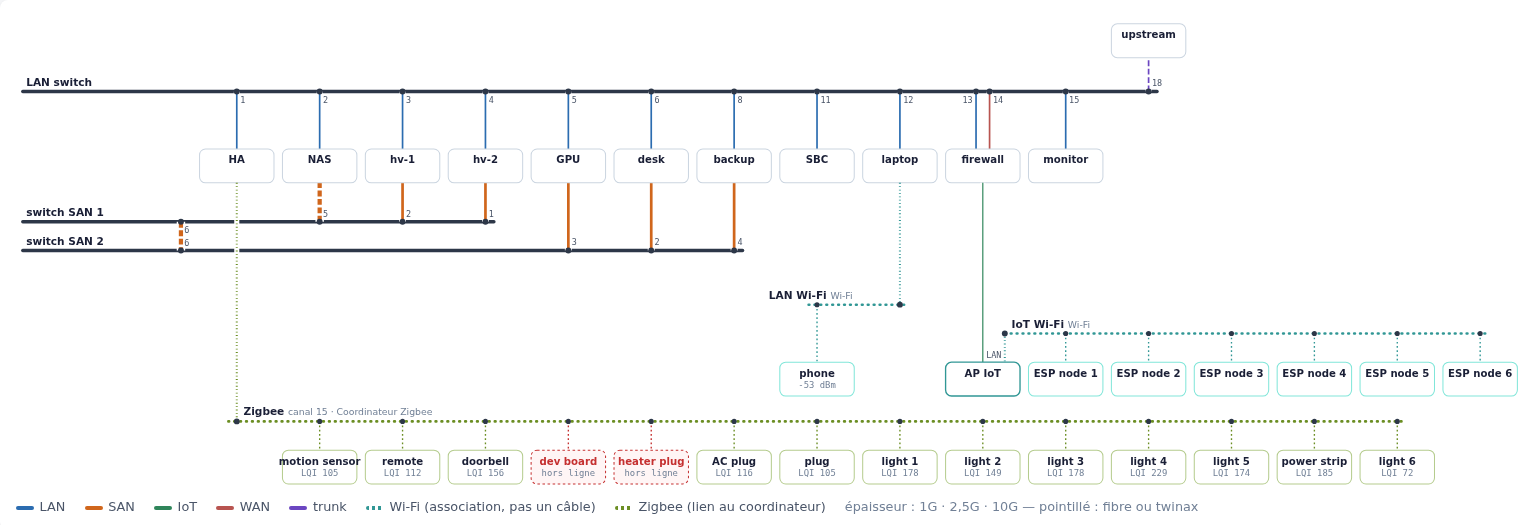
<p><a href="/assets/2026-10-12/net-map.png"><img src="/assets/2026-10-12/net-map.png" alt="The network map: switch rails with machines and port numbers, the two
storage-network switches below, then Wi-Fi rails and the Zigbee rail with
two devices offline in red" /></a></p>

<p><em>The network map (the UI is in French; click for full size). For this
post, machines and devices are renamed after their role (hv-1 and hv-2
are the hypervisors, “desk” is the workstation) and addresses are
removed. Solid lines are cables, coloured by network as in the legend at
the bottom; dotted teal lines are Wi-Fi associations (“association, pas
un câble”: association, not a cable); dotted green lines join Zigbee
devices to the coordinator. Line thickness is the link speed, and dotted
cables are fibre or twinax.</em></p>

<h2 id="moved-cables">Moved cables</h2>

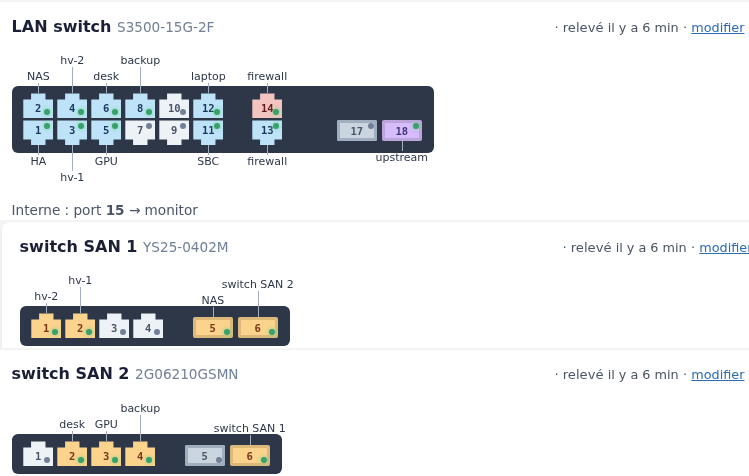
<p><a href="/assets/2026-10-12/switches.png"><img src="/assets/2026-10-12/switches.png" alt="Front panels of the three switches, drawn from text templates, with
the machine plugged into each port written next to it" /></a></p>

<p><em>Switch front panels, drawn from a small text template per model
(port order, SFP cages, gaps). Each port shows its link state (green dot)
and its network colour, and the machine at the other end of the cable is
written next to it. “Interne : port 15” (“internal”): this switch is
an appliance that combines a switch (14 RJ45 ports, 2 SFP cages and one
internal port) and an Atom single-board computer in one box, wired
together on the internal port 15. The SBC was recycled as
the monitoring machine (Nagios, Cacti), and the switch is the LAN core. “relevé il y a 6 min” means “collected 6 minutes
ago”.</em></p>

<p>Before, a machine replugged on another port of the same switch produced
three alerts: “declared here but seen there”, “link down”, and “port
with no cable”. Now the network page recognises the pattern and shows
<strong>one</strong> alert, “X changed port: declared on 5, seen on 7”, with a button
to correct the cable (and one to correct all moves at once).</p>

<p>A move is only proposed when all of these hold:</p>

<ul>
  <li>the switch was actually collected;</li>
  <li>the machine’s MACs are seen on <strong>exactly one</strong> port of that switch;</li>
  <li>that port is not already one of the machine’s declared ports;</li>
  <li>the destination port does not keep a cable that is staying in place.
If another cable on it is moving too, that is fine: two machines
swapping ports are two moves.</li>
</ul>

<p>The fix is recomputed when the button is pressed, not taken from the
page, and the cable’s notes get a line like “port 5 → 7 on 2026-10-12”.</p>

<h2 id="wi-fi">Wi-Fi</h2>

<p>Two kinds of access point so far:</p>

<ul>
  <li>A laptop that runs an access point: read over SSH, with a key that can
only run <code class="language-plaintext highlighter-rouge">iw station dump</code> (a forced command on the laptop’s side).</li>
  <li>An old <strong>3Com OfficeConnect</strong> AP, through its web interface. It has
quirks worth writing down. It only speaks <strong>HTTP/1.0</strong>. It has
<strong>one</strong> admin session, bound to the client IP. A new login always
succeeds, but it <strong>ejects</strong> the current session; the ejected browser
lands on <code class="language-plaintext highlighter-rouge">duplicate.htm</code>. So the collector always logs out
explicitly, and the person in front of the admin page will
occasionally be kicked out by it.</li>
</ul>

<p>On the map, each Wi-Fi network is a dotted rail, joined to whatever
carries the access point: the machine itself, or the cable to the
machine the AP is plugged into. Wi-Fi clients seen behind a machine are
listed under it, the same way virtual machines are listed under their
hypervisor.</p>

<h2 id="zigbee">Zigbee</h2>

<p>The Zigbee coordinator is a USB dongle on the Home Assistant box, run by
ZHA. The collector asks Home Assistant’s websocket API for
<code class="language-plaintext highlighter-rouge">zha/devices</code> (read only). PHP has no websocket client in its standard
library, so the collector includes a minimal one: about 70 lines for the
handshake, masked text frames out and unmasked frames in. It reuses the
same retry settings as the switch collectors. Home Assistant bans an IP
after repeated authentication failures, so the collector has its own
named token, and a refused token stops the run instead of being retried.</p>

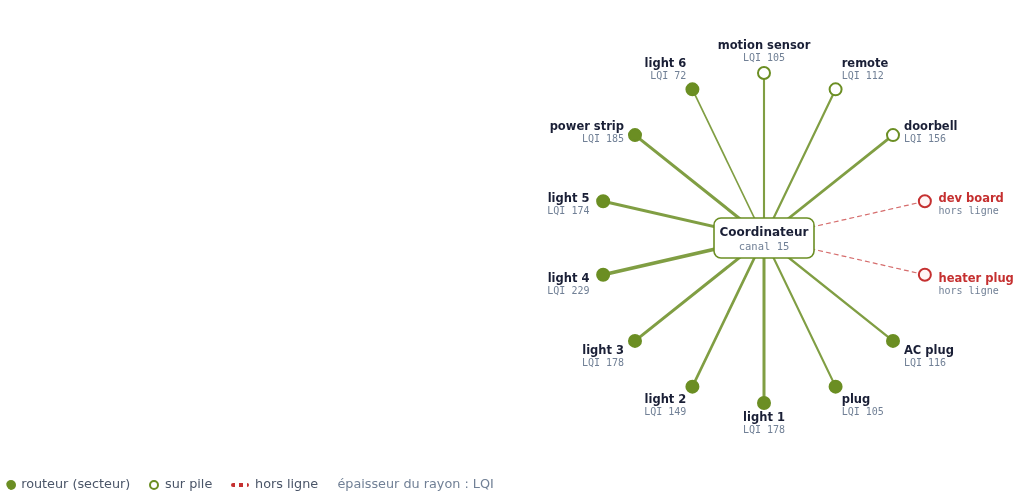
<p>The Zigbee page draws a star: each spoke’s thickness is the link quality
(LQI), and offline devices are red and dashed.</p>

<p><img src="/assets/2026-10-12/zigbee-star.png" alt="Zigbee star: the coordinator in the middle, devices around it with
their LQI, two offline devices in red with dashed lines" /></p>

<p><em>The Zigbee view, devices renamed for this post. The legend reads:
mains-powered router (filled), battery device (hollow), offline (red,
dashed), spoke thickness = LQI.</em></p>

<p>On the first run, two devices were offline. One was a plug named
“Chauffage” (heating, “heater plug” in the picture), offline since 26
September. That is the plug of the convector whose thermal fuse blew,
which the heating analysis later found again from the power meter.</p>

<h2 id="drawing-radio-on-the-map">Drawing radio on the map</h2>

<p>Wi-Fi and Zigbee are “radio groups”, drawn in three passes: rails first,
then the lines (on a halo where they cross a rail, so the crossing is
readable), then the boxes. Each technology gets its own row, Wi-Fi then
Zigbee, with its rails just above it. Each group sits under the thing it
is attached to, and the columns where lines arrive are reserved so that
nothing is drawn on top of them. The Zigbee coordinator is part of the
Home Assistant box, so it has no box of its own: the rail starts from
the box. The goal stays the same as for the cables: one big page,
readable, with nothing crossing that does not have to.</p>

<p>There is also a <strong>dark mode</strong> now: automatic, dark or light, stored per
browser.</p>

<h2 id="a-switch-that-forgot-its-settings">A switch that forgot its settings</h2>

<p>After the afternoon’s power cut, one of the 2.5 GbE switches on the
storage network came back with its old IP address and default
password. The settings changed ten days earlier had never been
<strong>saved</strong>: on this model, a change applies immediately but is lost on
reboot until you press Save under Device Management. Restoring the
backup only reapplied the password while running, so we set the IP again
by hand, then saved. A second, deliberate power cut confirmed it: the
switch came back with the right settings. Its config export now differs
from the reference by a single byte. The difference is stable and has no
visible effect.</p>

<p>The same power cut is why the air conditioner stayed off: see
<a href="/2026/10/12/stateless-air-circulation-home-assistant/">the air-circulation post</a>.</p>

<p class="coauthors"><em>Written by Jonathan (462engineering) and Claude (Claude Opus 5.5, Anthropic) — research, debugging and drafting done together in a Claude Code session.</em></p>]]></content><author><name>Jonathan (462engineering) &amp; Claude (Anthropic)</name></author><category term="inventory" /><category term="network" /><category term="zigbee" /><category term="wifi" /><category term="php" /><category term="home-assistant" /><summary type="html"><![CDATA[Additions to our in-house inventory and network map (PHP + PostgreSQL): detecting a machine replugged on another port from switch MAC tables, Wi-Fi and Zigbee collectors (a 3Com AP that ejects your session, a minimal PHP websocket client for Home Assistant ZHA), radio groups on the map, dark mode, and a switch that forgot its settings after a power cut.]]></summary></entry><entry><title type="html">2026-09-28</title><link href="https://462eng.github.io/2026/09/28/2026-09-28/" rel="alternate" type="text/html" title="2026-09-28" /><published>2026-09-28T09:00:00+00:00</published><updated>2026-09-28T09:00:00+00:00</updated><id>https://462eng.github.io/2026/09/28/2026-09-28</id><content type="html" xml:base="https://462eng.github.io/2026/09/28/2026-09-28/"><![CDATA[<p>A summary of the day. Each problem below was found while working on the
previous one, so this post follows them in order. Details are in the
linked posts.</p>

<h2 id="bring-up-debian-13-rdna4-valve-index">Bring-up: Debian 13, RDNA4, Valve Index</h2>

<p>The GPU box is a Debian 13 machine with a Radeon AI PRO R9700 (RDNA4).
RDNA4 needs the kernel, Mesa and firmware from trixie-backports. evdi
needs version 1.15.1 to build on kernel 7.1. We also hit a few
boot-time problems (a missing display manager unit, an initramfs that
picked up <code class="language-plaintext highlighter-rouge">.link</code> backups) and a few Steam and Index details.
→ <a href="/2026/09/28/notes-debian-13-rdna4-index/">Small notes: Debian 13 + RDNA4 + Index</a></p>

<h2 id="playing-from-the-desk-sremfb">Playing from the desk: sRemFB</h2>

<p>To use the GPU box from the workstation, sRemFB creates an evdi virtual
display on it and streams uncompressed or LZ4 damage rectangles to a new
windowed viewer. Keyboard, mouse and gamepad go back over uinput, and
audio over UDP. Key to pixel: 8.7 ms median on 2.5 GbE.
→ <a href="/2026/09/28/sremfb-playing-on-the-gpu-box-without-a-codec/">Playing on the GPU box from the desk, without a video codec</a></p>

<h2 id="steamvr-judder-and-moving-to-monado">SteamVR judder, and moving to Monado</h2>

<p>In SteamVR, menus and overlays judder. On Linux, SteamVR runs without
async reprojection. Enabling it, or asking for 120 Hz, ends with
<code class="language-plaintext highlighter-rouge">flip_done timed out</code> and a killed compositor. Monado with SteamVR’s own
Lighthouse driver, xrizer and WayVR runs smoothly at 90, 120 and 144 Hz
on the same hardware.
→ <a href="/2026/09/28/steamvr-linux-overlay-judder-rdna4-monado/">SteamVR on Linux: overlay/UI judder on RDNA4, and why Monado fixes it</a></p>

<h2 id="mutter-never-forgets-an-unplugged-gpu">mutter never forgets an unplugged GPU</h2>

<p>mutter never removes a GPU that has been unplugged, and Xwayland keeps
its DRM fd. Every removed evdi card leaves a stale DRM lease device. In
the end, SteamVR and Monado both stall on them.
→ <a href="/2026/09/28/mutter-never-forgets-unplugged-gpu/">mutter never forgets an unplugged GPU (and what it does to VR)</a></p>

<h2 id="how-the-problems-connect">How the problems connect</h2>

<ol>
  <li><strong>sRemFB</strong> creates <strong>evdi cards</strong> on the GPU box.</li>
  <li>With evdi cards present, <strong>SteamVR’s DRM lease breaks</strong>
(<code class="language-plaintext highlighter-rouge">dc_stream_state is NULL</code>, <code class="language-plaintext highlighter-rouge">flip_done timed out</code>).</li>
  <li>The first fix was to <strong>remove the evdi cards</strong> before starting VR.</li>
  <li>But <strong>mutter never forgets a removed GPU</strong>. Each removed card leaves a
stale <code class="language-plaintext highlighter-rouge">wp_drm_lease_device_v1</code> global, and Xwayland keeps its fd.</li>
  <li>The <strong>stale globals block VR</strong>: SteamVR loops after
<code class="language-plaintext highlighter-rouge">LeaseDevice_Done</code>, and Monado waits forever for <code class="language-plaintext highlighter-rouge">done</code> events, or
picks a stale device that advertises the Index’s connector.</li>
  <li>With a <strong>patched Monado</strong> (bounded wait, no silent fallback, optional
DRM node pinning), Monado ignores the stale devices. It also runs
fine <strong>alongside evdi</strong>, which SteamVR does not.</li>
  <li>So there is no longer any reason to remove evdi cards:
<strong><code class="language-plaintext highlighter-rouge">sremfb-server</code> now runs permanently</strong>. No cards are removed, so no
stale devices are created.</li>
</ol>

<p>A mutter patch for the root cause exists but <strong>has not been tested</strong>. It
is published as an RFC in the mutter post.</p>

<p class="coauthors"><em>Written by Jonathan (462engineering) and Claude (Claude Opus 5.5, Anthropic) — research, debugging and drafting done together in a Claude Code session.</em></p>]]></content><author><name>Jonathan (462engineering) &amp; Claude (Anthropic)</name></author><category term="daily" /><category term="daily" /><category term="vr" /><category term="mutter" /><category term="sremfb" /><category term="debian" /><summary type="html"><![CDATA[Daily summary: Debian 13 + RDNA4 + Index bring-up, SteamVR judder and the move to Monado, mutter stale GPUs and DRM lease devices, sRemFB from the desk, and how they connect.]]></summary></entry><entry><title type="html">Small notes: Debian 13 + RDNA4 + Index</title><link href="https://462eng.github.io/2026/09/28/notes-debian-13-rdna4-index/" rel="alternate" type="text/html" title="Small notes: Debian 13 + RDNA4 + Index" /><published>2026-09-28T08:30:00+00:00</published><updated>2026-09-28T08:30:00+00:00</updated><id>https://462eng.github.io/2026/09/28/notes-debian-13-rdna4-index</id><content type="html" xml:base="https://462eng.github.io/2026/09/28/notes-debian-13-rdna4-index/"><![CDATA[<p>Short list of pitfalls from setting up a Debian 13 machine for VR and
gaming. The VR-specific findings have their own posts:
<a href="/2026/09/28/steamvr-linux-overlay-judder-rdna4-monado/">SteamVR judder and Monado</a>
and <a href="/2026/09/28/mutter-never-forgets-unplugged-gpu/">mutter’s stale GPUs</a>.</p>

<h2 id="the-machine">The machine</h2>

<table>
  <thead>
    <tr>
      <th> </th>
      <th> </th>
    </tr>
  </thead>
  <tbody>
    <tr>
      <td>OS</td>
      <td>Debian 13 (trixie)</td>
    </tr>
    <tr>
      <td>Kernel</td>
      <td>7.1.8 (trixie-backports)</td>
    </tr>
    <tr>
      <td>GPU</td>
      <td>AMD Radeon AI PRO R9700 (Navi 48, RDNA4, gfx1201, DCN 4.0.1)</td>
    </tr>
    <tr>
      <td>Mesa</td>
      <td>26.1.6 (trixie-backports, RADV GFX1201)</td>
    </tr>
    <tr>
      <td>Firmware</td>
      <td>firmware-amd-graphics 20260810 (trixie-backports)</td>
    </tr>
    <tr>
      <td>CPU</td>
      <td>AMD Ryzen 9 5950X</td>
    </tr>
    <tr>
      <td>Desktop</td>
      <td>GNOME 48 / mutter 48.7, Wayland (exposes <code class="language-plaintext highlighter-rouge">wp_drm_lease_device_v1</code>)</td>
    </tr>
    <tr>
      <td>VR</td>
      <td>Valve Index, 2 base stations 2.0, Index controllers</td>
    </tr>
    <tr>
      <td>Runtime</td>
      <td>SteamVR 2.17.10, Proton Experimental</td>
    </tr>
    <tr>
      <td>Virtual displays</td>
      <td>evdi 1.15.1 (repackaged, see below)</td>
    </tr>
  </tbody>
</table>

<h2 id="pitfalls">Pitfalls</h2>

<ul>
  <li><strong>Use trixie-backports for RDNA4.</strong> Take the kernel, Mesa and
<code class="language-plaintext highlighter-rouge">firmware-amd-graphics</code> from backports.</li>
  <li><strong>No <code class="language-plaintext highlighter-rouge">display-manager.service</code>.</strong> gdm was installed but had never been
enabled, so <code class="language-plaintext highlighter-rouge">display-manager.service</code> did not exist.</li>
  <li><strong>Never keep <code class="language-plaintext highlighter-rouge">.link</code> backups under <code class="language-plaintext highlighter-rouge">/etc/systemd/network</code>.</strong> The
initramfs hook <code class="language-plaintext highlighter-rouge">/usr/share/initramfs-tools/hooks/udev</code> copies <code class="language-plaintext highlighter-rouge">*.link</code>
files from <code class="language-plaintext highlighter-rouge">/etc/systemd/network</code> <strong>recursively</strong>, and puts them all
in one directory in the initramfs. Backups in a subfolder therefore
become active at boot. This happened to us: after installing the new
kernel, a NIC got the wrong name at boot. Keep backups somewhere else.</li>
  <li><strong>evdi 1.15.1 is needed for kernel 7.1.</strong> Debian’s evdi 1.14.8 does not
build against 7.1: API errors about <code class="language-plaintext highlighter-rouge">drm_driver.date</code>, <code class="language-plaintext highlighter-rouge">struct_mutex</code>
and <code class="language-plaintext highlighter-rouge">fb_debug_enter</code>. We repackaged 1.15.1.</li>
  <li><strong>Proton for all games.</strong> In Steam’s <code class="language-plaintext highlighter-rouge">config.vdf</code>, a
<code class="language-plaintext highlighter-rouge">CompatToolMapping</code> entry for app id <code class="language-plaintext highlighter-rouge">"0"</code> sets the default
compatibility tool.</li>
  <li><strong>Installing a Steam game without a screen.</strong> With Steam closed, put an
<code class="language-plaintext highlighter-rouge">appmanifest_&lt;appid&gt;.acf</code> with <code class="language-plaintext highlighter-rouge">"StateFlags" "1026"</code> in the library’s
<code class="language-plaintext highlighter-rouge">steamapps/</code> directory. At its next start, Steam downloads the
game.</li>
  <li><strong>The Index camera is a plain UVC device.</strong> It is a side-by-side
stereo camera: 1920×960 total, 960×960 per eye. It offers MJPEG or
YUYV at 15–54 fps. It can be read with V4L2 <strong>while SteamVR is
running</strong>, as long as SteamVR itself is not streaming from it.</li>
  <li><strong><code class="language-plaintext highlighter-rouge">setcap</code> does not survive updates.</strong> <code class="language-plaintext highlighter-rouge">CAP_SYS_NICE</code> on SteamVR’s
<code class="language-plaintext highlighter-rouge">vrcompositor-launcher</code> is lost at every SteamVR update, and the same
goes for <code class="language-plaintext highlighter-rouge">monado-service</code> after every <code class="language-plaintext highlighter-rouge">cmake --install</code>.</li>
  <li><strong>Index audio goes through DisplayPort.</strong> The sink only exists while
the headset is on. Use <code class="language-plaintext highlighter-rouge">wpctl set-default</code> once, and WirePlumber
remembers it (details in the
<a href="/2026/09/28/steamvr-linux-overlay-judder-rdna4-monado/#index-audio">SteamVR/Monado post</a>).</li>
</ul>

<p class="coauthors"><em>Written by Jonathan (462engineering) and Claude (Claude Opus 5.5, Anthropic) — research, debugging and drafting done together in a Claude Code session.</em></p>]]></content><author><name>Jonathan (462engineering) &amp; Claude (Anthropic)</name></author><category term="debian" /><category term="rdna4" /><category term="amdgpu" /><category term="steam" /><category term="valve-index" /><category term="notes" /><summary type="html"><![CDATA[Debian 13 trixie-backports kernel/Mesa/firmware for RDNA4, missing display-manager.service, initramfs udev hook copying .link files recursively, evdi 1.15.1 on kernel 7.1, Proton CompatToolMapping, appmanifest StateFlags 1026, Index camera over UVC/V4L2.]]></summary></entry><entry><title type="html">Playing on the GPU box from the desk, without a video codec (sRemFB)</title><link href="https://462eng.github.io/2026/09/28/sremfb-playing-on-the-gpu-box-without-a-codec/" rel="alternate" type="text/html" title="Playing on the GPU box from the desk, without a video codec (sRemFB)" /><published>2026-09-28T08:00:00+00:00</published><updated>2026-09-28T08:00:00+00:00</updated><id>https://462eng.github.io/2026/09/28/sremfb-playing-on-the-gpu-box-without-a-codec</id><content type="html" xml:base="https://462eng.github.io/2026/09/28/sremfb-playing-on-the-gpu-box-without-a-codec/"><![CDATA[<p><strong>Short version:</strong> <a href="https://github.com/462eng/sRemFB">sRemFB</a> now has a
desktop viewer, input forwarding and audio. On a 2.5 GbE link, the delay
from a key press to the pixel arriving at the desk is <strong>8.7 ms median</strong>
at idle. The video is sent as raw or LZ4-compressed damage rectangles,
never encoded to video. Playing up to 60 fps “runs as if it were local”
(the user’s verdict).</p>

<h2 id="setup">Setup</h2>

<p>sRemFB is our “network monitor” project. On the server, it creates a
<strong>virtual display</strong> using EVDI, the DisplayLink kernel module. GNOME
treats it as a real monitor that gets plugged in. The server then sends
the damaged rectangles of that display over TCP, raw or LZ4-compressed.
Here the server is the GPU box (Radeon R9700, GNOME 48 on Wayland) and
the client is the workstation at the desk.</p>

<p>The desktop viewer <strong>never uses H.264</strong> or any other video codec. We
chose this because the goal was the lowest possible latency, and a
2.5 GbE LAN has enough bandwidth for most content.</p>

<p>The features below are on a development branch and will be in <strong>the next
release</strong>.</p>

<h2 id="whats-new">What’s new</h2>

<h3 id="sremfb-view-a-windowed-client"><code class="language-plaintext highlighter-rouge">sremfb-view</code>, a windowed client</h3>

<ul>
  <li>SDL3, native Wayland.</li>
  <li>VSync off by default. The viewer always presents the <strong>most recent
frame</strong>; there is no frame queue at any point.</li>
  <li>It plugs a virtual monitor into the remote GNOME session exactly like
a hardware client does. GNOME remembers its position like any other
screen.</li>
</ul>

<h3 id="keyboard-mouse-and-gamepad-over-uinput">Keyboard, mouse and gamepad over uinput</h3>

<ul>
  <li>On the server, input is replayed through <strong>uinput</strong> devices. This is
<strong>off by default</strong> and enabled with <code class="language-plaintext highlighter-rouge">SREMFB_INPUT=1</code>.</li>
  <li>Mouse: <strong>absolute</strong> by default (like QEMU’s tablet device), or
<strong>captured relative</strong> mode for games.</li>
  <li>Gamepad: appears as an Xbox 360 pad (<code class="language-plaintext highlighter-rouge">045e:028e</code>), which Steam and SDL
recognise.</li>
  <li>On disconnect (or focus loss, or a lost link), <strong>everything is
released</strong> on the remote side, so no key or button stays pressed.</li>
</ul>

<h3 id="audio">Audio</h3>

<ul>
  <li>The server creates a virtual <strong>PipeWire sink</strong>.</li>
  <li>Audio is sent as raw <strong>PCM S16LE, 48 kHz</strong> over UDP, in packets of 128
frames (2.7 ms).</li>
  <li>The client aims for a <strong>10 ms buffer</strong>. When it gets ahead, it
<strong>drops samples instead of letting latency drift</strong>.</li>
</ul>

<h3 id="display-layout-re-applied-as-temporary">Display layout re-applied as <em>temporary</em></h3>

<p>mutter’s <code class="language-plaintext highlighter-rouge">monitors.xml</code> is keyed by connector name, and the connector
name changes each time the evdi card is recreated. The server therefore
re-applies the remembered layout itself. It uses the <strong>temporary</strong>
method: a <em>persistent</em> <code class="language-plaintext highlighter-rouge">ApplyMonitorsConfig</code> makes GNOME show “Keep these
display settings?”, and GNOME reverts after 20 s if nobody confirms.</p>

<h3 id="a-drop_master-fix">A <code class="language-plaintext highlighter-rouge">DROP_MASTER</code> fix</h3>

<p>sremfb-server keeps a lock fd on each evdi card. When mutter released a
card, this lock fd could <strong>become DRM master</strong> of that card. After that,
mutter’s <code class="language-plaintext highlighter-rouge">TakeDevice</code> failed with <code class="language-plaintext highlighter-rouge">EBUSY</code>, permanently. The server now
drops master on that fd.</p>

<h3 id="living-with-mutters-gpu-hotplug-bug">Living with mutter’s GPU hotplug bug</h3>

<p>mutter never forgets a removed GPU. That affects evdi cards directly,
and has consequences for VR too; see
<a href="/2026/09/28/mutter-never-forgets-unplugged-gpu/">mutter never forgets an unplugged GPU</a>.
The server creates its cards one at a time. It keeps a card only if
gnome-shell opens it within 1.5 s, and never reuses a number that mutter
refused. In practice, we also leave the server running permanently.</p>

<h2 id="measurements">Measurements</h2>

<p>All timings are taken on <strong>the client’s clock alone</strong>: input sent, then
the matching pixel <strong>received and decoded</strong> at the client. They do
<strong>not</strong> include the client’s own compositor, scanout, or display
latency.</p>

<table>
  <thead>
    <tr>
      <th>Case</th>
      <th>Result</th>
    </tr>
  </thead>
  <tbody>
    <tr>
      <td>Link (iperf3)</td>
      <td>2.47 Gbit/s on 2.5 GbE</td>
    </tr>
    <tr>
      <td>Key → pixel received, idle</td>
      <td>median <strong>8.7 ms</strong>, p95 <strong>10.9 ms</strong></td>
    </tr>
    <tr>
      <td>Remote cursor movement</td>
      <td><strong>0.5 ms</strong></td>
    </tr>
    <tr>
      <td>Key → pixel, full-screen noise, RAW (≈210–300 MB/s)</td>
      <td>median <strong>~28 ms</strong></td>
    </tr>
    <tr>
      <td>Animated desktop</td>
      <td>60 fps at 2.1 MB/s</td>
    </tr>
    <tr>
      <td>Full-screen noise</td>
      <td>≈36 fps received (link saturated)</td>
    </tr>
    <tr>
      <td>Audio: click received</td>
      <td>median <strong>1.5 ms</strong></td>
    </tr>
    <tr>
      <td>Audio: estimated output latency</td>
      <td>~15 ms</td>
    </tr>
    <tr>
      <td>Audio: long run</td>
      <td>10 min 40 s, no loss, no drift</td>
    </tr>
    <tr>
      <td>Video latency with audio on</td>
      <td>unchanged</td>
    </tr>
  </tbody>
</table>

<p>Under full-screen noise, the time is dominated by transmission. One raw
frame is 8.3 MB, which takes about 27 ms at 2.5 Gbit/s. Normal desktop
and game content changes much less of the screen per frame.</p>

<p>In games up to 60 fps, the user reported it “runs as if it were local”.</p>

<h2 id="not-done-yet">Not done yet</h2>

<p>For very animated content, one idea is <strong>per-tile JPEG</strong>: each tile
encoded as an independent image, with no inter-frame state. This would
cut bandwidth without adding the buffering a video codec needs. It is
<strong>not implemented</strong>.</p>

<p class="coauthors"><em>Written by Jonathan (462engineering) and Claude (Claude Opus 5.5, Anthropic) — research, debugging and drafting done together in a Claude Code session.</em></p>]]></content><author><name>Jonathan (462engineering) &amp; Claude (Anthropic)</name></author><category term="sremfb" /><category term="evdi" /><category term="latency" /><category term="pipewire" /><category term="uinput" /><category term="gnome" /><summary type="html"><![CDATA[sRemFB windowed viewer sremfb-view (SDL3): EVDI virtual display, RAW/LZ4 damage rectangles over TCP, no H.264; keyboard, mouse and Xbox 360 gamepad over uinput; PipeWire audio as PCM over UDP; 8.7 ms key-to-pixel on 2.5 GbE; DROP_MASTER fix.]]></summary></entry></feed>